
Convert Shared Mailboxes into Organized Support Queues
The email ticketing system enables service and support teams to capture and manage all customer inquiries, replies, and conversations received via email within shared inboxes into queue-based organization.

What is an Email Ticketing System?
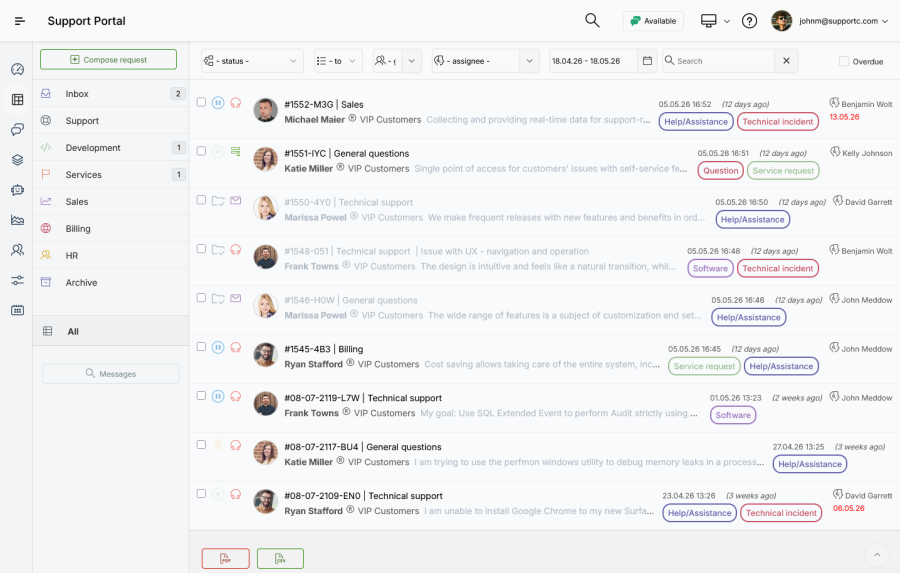
An email ticketing system is a set of tools that automatically converts incoming emails into structured requests and tickets. Afterwards, tickets can be assigned, prioritized, tracked, and resolved. It includes several core technologies. The most important is the email parsing with metadata extraction. After a message is successfully parsed and metadata is extracted, the email is automatically converted into a ticket including all relevant data: subject, timestamp, sender name and address, message body, and attachments.
The email is further stored into labeled containers or queues that hold tickets sharing similar attributes and business functions. These queues are named and arranged according to the team's requirements and the types of services they deliver. Examples include: Support, Sales, Marketing, Development, Billing, and others. Access to specific queues by agents is established through permissions corresponding to their roles and responsibilities.
Support Directly from Email
The email ticketing system works alongside your existing support workflows, offering non-technical users an additional communication channel. If users are less comfortable with using web-based forms, they can still easily create and manage requests and inquiries via email.
Agents and customers can use their preferred email applications to provide and receive support: Gmail, Outlook, Apple Mail, and others. The system stores each new message and its data as any other request or submission, ensuring every email, reply, attachment, and update remains linked to the correct ticket.
The full synchronization between email data and the database is monitored by the automation engine. Real-time updates and logging of each modification, whether it's a simple reply or the addition of a new attachment, ensure that all interactions remain consistent.


Two-Way Email Synchronization
The integrated email-to-ticket utility provides two-way email synchronization and parsing: incoming emails that create a new tickets, and replies to automated email notifications.
Create Tickets from Incoming Emails
Your clients can simply send a new message to an inbound address, and the utility extracts all structured data from the message directly to the ticket list.
Track Email Replies
When an agent or customer replies to a received notification, the message and all data are appended to the ticket action log.
Update Tickets Without Leaving Inbox
Agents can perform ticket actions directly through email replies. They can harness specific commands in replies, streamlining assignments and internal message submissions for effective service and support. After the reply submission, each command is further analyzed by the system, and forwarded to the automation engine.
Custom Ticket Actions
Along with the ordinary replies to customers, agents can append the most frequently used ticket actions to the message: assign to agent, and close a ticket.
Communicate Within the Team
Send comments and internal notes directly from your email software, without logging into the help desk. Messages are further appended to the ticket log, and delivered to agents as email messages and as popup notifications.
Integration with Automation Engine
Incoming messages are monitored by the automation engine and its rules, enabling extended automation of the most frequently used commands across the help desk.


Persistent User Profiles
Regardless of the communication channel, the help desk system recognizes each sender's name and address maintaining persistent customer and agent profiles, and provides omnichannel support with personalized responses.