
Free Help Desk Software for Startups and Internal Teams
Get started quickly with cloud-based help desk that requires no installation, maintenance, or specialized training.
Ensure Outstanding Client Service
Startups, small and internal teams need specialized software to manage customer requests and support activities. With these requirements in focus, we provide free help desk software suitable for any company that fits the following profile:
- Support or service team with up to 3 members
- Deals with only a few requests or support tickets per day
- Does not want to waste resources on software installation and maintenance
- Serves different types of companies and clients with B2B or B2C relationships
- Wants to get started working without extensive training.
Simplified Setup and Daily Use
Sympoq enables service and support teams to coordinate their tasks, ensure consistent processes, and reduce human error without worrying about costs or maintenance of IT assets. With service-oriented features, UX design, and cloud architecture, the following core benefits required for growing teams are provided:
Proactive Support
Identify recurring issues and address them proactively. Prevent future problems by identifying common request types and patterns.
Consistent Service Quality
Define custom automation rules to match your support processes. Ensure that customers receive consistent responses across the team.
Scalability
Continue to use the same system without interruption as your team, customer base, and request volume grow.
Automated Support Ticketing with Team Collaboration
The support ticketing system provides a set of advanced support capabilities needed to resolve issues and requests in an automated manner.
Agent Portal
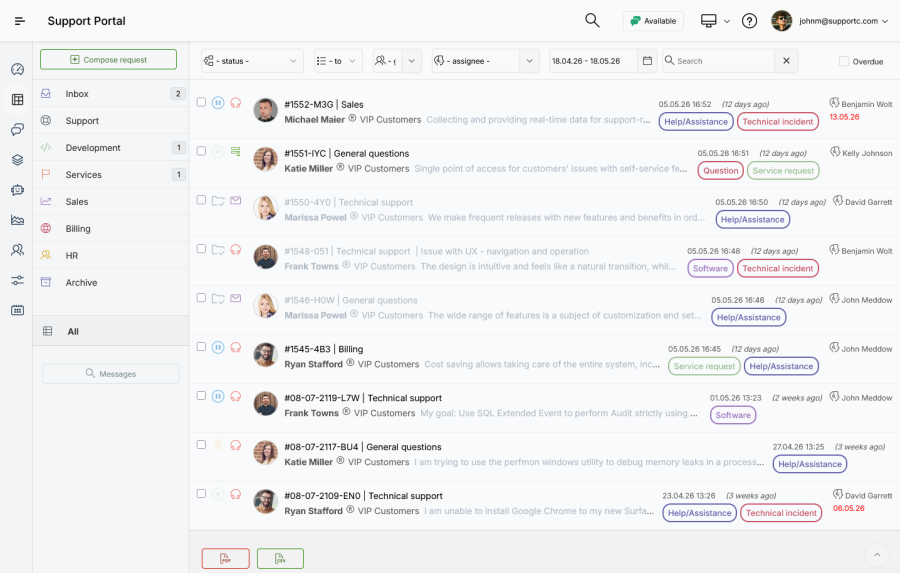
The agent portal serves as a private workspace with summary information on their recent support activity and workload. Agents track customer requests and inquiries using custom-designed ticket views and action forms. Access to live chat sessions enables real-time conversations with customers.
Ticket Queues
Ticket queues enables you to organize requests so they reach agents with the appropriate skills and responsibilities. Instead of using separate email inboxes, all conversations, including replies, comments, various events and actions, are stored in a centralized database. These are further organized into ticket queues accessible to agents and support teams with dynamically set access permissions.
Automation Rules
Advanced automation settings provide automated classification, prioritization, and assignment. Using a fully customizable set of rules, all incoming requests can be categorized, prioritized, and routed automatically to perform further actions. For example, tickets can be automatically assigned to the best available agent, depending on different attributes: subject, description, customer name or email, etc.
Scheduled Actions
Automated routing, assignment, and notifications with time-defined execution are provided for extended ticket management. The time-dependent conditions monitor several attributes: the submission date and time, the time before and after the deadline, and the time elapsed since the last response. Depending on these conditions, tickets can be further reassigned, additionally categorized, moved to a specific queue, or escalated to a higher level of support.
Email Templates
Email templates control the content and structure of delivered messages and alerts. A wide range of variable placeholders populates messages with ticket and user data, e.g., subject, topic, submission date, customer name and group, and others. The settings section enables modification of predefined templates, as well as the design of custom templates to ensure continuous information.
Multichannel Communication
Email Ticketing
Two-way email conversion and integration enable full data synchronization with external email servers. The only requirement is to set up a simple forwarding of company email addresses to one or more addresses provided by Sympoq. Afterward, all messages are regularly converted and stored in the database, whether they are sent as a new request or as a reply to messages. The utility is designed for both customers and agents, enabling them to use the common email client software, e.g., Gmail, Outlook, and more.
Push Notifications
Support agents receive real-time notifications whenever an important event occurs: when they are assigned a new ticket, when they receive an internal message, or when a new ticket has been submitted. The notifications are sent via the web notifications API, which displays messages on browsers, as well as in a device notification center, e.g., Windows, iOS, and Android. Information about all important events is instantly delivered to recipients, even before the email message arrives, enabling real-time messaging.
Help Widget
With the integration of the help widget into a website or a web application, customers can use an additional communication channel. Instead of logging into the portal or using email software, they can open a pop-up widget while browsing your website. The only requirement is to place a small JavaScript snippet on website pages, providing direct access to request submission, live chat, and knowledge base sections.
Multiple Submission Forms
Submission forms serve as a crucial gateway to the support ticketing system. Given that requests on various topics can be submitted, you can create multiple forms featuring customized fields. You can add text fields, select lists, or date-time fields to gather specific information from customers. The collected data is subsequently recorded, attached to tickets, and presented alongside other information.
Why choose Sympoq?
- It's an automated and secure free help desk software available in the cloud.
- Our team of experts is here to help you with the integration and settings.
- In a short time, you will enhance trust and confidence with customers.
Full Automation of Routine Help Desk Tasks
Respond to customer inquiries, provide timely responses, and improve support performance. Easily set up and enjoy flawless communication with customers!