Adoption Roadmap
Help desk adoption is much more than configuring software. It is also an opportunity to create a structured support operation that can grow with your team and customer base.
This roadmap outlines the major steps in help desk adoption. It provides a practical path from initial setup to a production-ready help desk that can scale with your team and customer base.
Info
For most of the settings, default values are provided to help you during initial configuration. You can replace them with values that match your organization's requirements.
Estimated Adoption Time
The actual implementation time depends on the size of the service or support team, the number of support channels, the complexity of your workflows, and whether documented support processes already exist.
| Deployment Scenario | Team Size | Complexity | Typical Time |
|---|---|---|---|
| Minimal quick start | 1-5 agents | Low | 3-4 hours |
| Small team setup | 6-15 agents | Low-Medium | 1 business day |
| Standard deployment | 16-30 agents | Medium | 2-3 business days |
| Advanced operation | 31+ agents | Medium-High | 4-7 business days |
| Enterprise implementation | Multiple teams and departments | High | 1-3 weeks |
In the next section, along with each step, the estimated effort is presented. The required time is estimated based on different number of support agents and users, workflow automation requirements, and existing processes are being migrated from another system.
Short Guide
Performing the following steps in the recommended sequence will save time and help you build a well-structured help desk system.
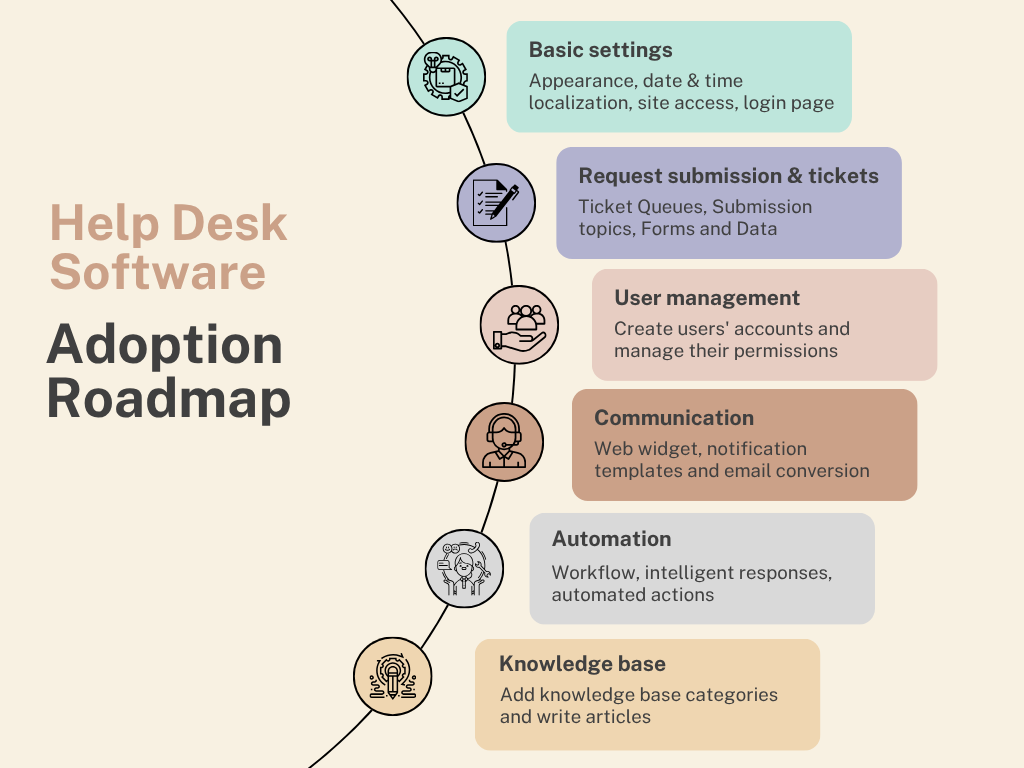
Each step builds on the previous one. Start by configuring the core system settings and defining how requests are collected and organized. Next, establish user access, communication channels, and automation rules. Finally, enhance your support operation with AI chatbot and advanced configuration options.
1. Basic Configuration
Estimated effort: 30-60 minutes
Configure the foundation of your help desk before creating users, queues, or automation. These settings determine how the system looks, behaves, and interacts with guest users.
- Site Appearance: Apply your company branding, logos, and color schemes.
- Localization: Configure timezone and date format.
- Guest access: Define which resources can be accessed without authentication.
- Login page: Customize the sign-in experience for users.
2. Ticket Management
Estimated effort: 45-90 minutes
Design how customer requests will be collected, categorized, and processed with:
- Ticket Queues: Organize requests by department, team, priority, topic, or service area.
- Submission Topics: Create categories that help customers submit requests to the appropriate team (e.g., Billing, Technical Support, Sales).
- Submission Forms: Collect the information agent needs to resolve requests more efficiently.
3. User Registration & Permissions
Estimated effort: 30-60 minutes
Define who can access the system and what actions they are allowed to perform.
- Create user accounts for:
- Support Agents who manage requests and communicate with customers.
- Customer Accounts that allow customers to submit and track requests.
- Assign roles and permissions to align with organizational responsibilities.
4. Communication Setup
Estimated effort: 1-3 hours
Connect support channels and configure customer communications.
- Customize Notification templates for consistent, customized and automated notifications.
- Configure Email-to-ticket conversion to convert customer and agent emails into tickets and automatically route tickets into the appropriate queues.
- Deploy the Web Widget to allow customers direct access to the help desk from your website.
5. Automation Tools
Estimated effort: 3-5 hours
Common automation scenarios include steps to:
- Automate Request Submission and ticket updates.
- Configure Scheduled Actions for time-based workflows.
- Set up Notifications rules that trigger alerts based on ticket events and status changes.
- Create Canned Replies to respond faster with common responses.
6. Advanced Settings
Estimated effort: 30-60 minutes
Enhance and fine-tune your help desk implementation.
- Configure Ticket Tags to label tickets for easier filtering and reporting.
- Enable Self-Registration for access to customer support portal with their own accounts.
7. AI Chatbot
Estimated effort: 1-3 hours
Build a self-service support experience for customers and team members:
- Set up AI Chatbot to deliver 24/7 answers to questions and add data sources.
Planning and Deployment
To set up help desk software that reflects your service and support structure, you need a good understanding of that structure and the customer support processes. Before starting with the adoption, try answering the following questions:
Information recording and tracking
- What information do you want to record and track for each issue and support ticket?
- How do you categorize issues?
- Do you manage and coordinate issues and requests into ticket queues? Sympoq allows you to define multiple ticket queues and organize requests into queues based on different criteria.
Support process
- What is your customer service and support process?
- Can you represent the path of an issue through the process as a sequence of steps and decision points, such as New, Working, Waiting, and Solved?
- Who should have permission to make each decision? Who will be responsible for carrying out each step in the process?
- Do you need email notifications to enforce ownership and accountability when requests and tickets are submitted or solved? Who needs to be alerted? What information should the notification message contain?
Roles and responsibilities
- What are the different roles and responsibilities of your team - such as analysts and group leaders?
- Can you divide customers and their users into groups?
- Do different groups have different requirements for the system?
- Do you need to restrict access to the system and organize an internal help desk?
For example, you probably want to give them limited access to the system so they can send new requests and keep track of their status. Support staff, on the other hand, require higher access to the system.