
Embed Help Center Into Your Website for Direct Assistance to Visitors
The help web widget enables integration and immediate access to help desk resources from your website or a web application.
How Help Desk Web Widget Works?
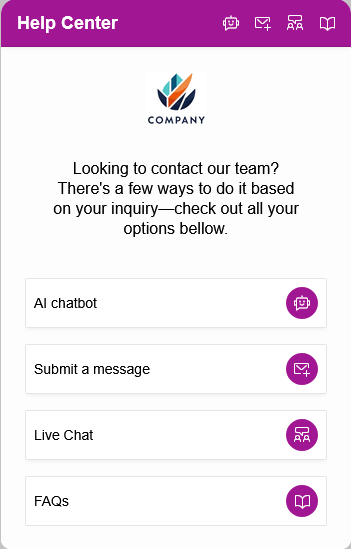
The widget is displayed as a floating web button on a website. When a user clicks the floating button, the widget occupies a section of the screen with available menu options, overlaying on top of web pages. This way, customers have direct access to team members without leaving the website, providing a more convenient way to get help:
- Easily adopt to any popular Content Management System, including WordPress, Shopify, Wix, Squarespace, custom websites, and static HTML pages.
- Include in a web application: simply paste the same code into the footer of the master template, or only into selected pages of the application.
Integration with Support Portal
The widget brings another supprot and service channel to the portal. Customers do not need to leave the website or web application to request support. Whenever a new request is submitted, or a live chat session is started, team members are immediately notified to respond from their dashboards.
Turn Requests into Tickets
Every visitor's query is instantly logged and ready for further automation in the ticketing system, ensuring all relevant information is captured automatically.
Lightweight Experience
Developed with performance in mind, the widget provides rapid loading capabilities without compromising your site's efficiency.
Monitor Widget Usage
The overall interaction with the widget is logged, providing detailed information on how support team is contacted including entire conversation.
Unified Support Channels
The widget provides access to several resources, depending on your settings. By offering direct access through multiple channels, you cater to customers' preferences, making it easier for customers to get help or contact your team. You can combine a request submission or contact form, AI chatbot, live chat, and a section with knowledge base or frequently asked questions (FAQs):
AI Chatbot
Extends your help desk self-service capability providing answers to customers based on your internal knowledge.
Contact Form
Collects customer details and requests through a customizable contact form and ensures timely response to queries.
Live Chat
Offers real-time assistance with a live chat feature that guides customers to the appropriate team member.
Knowledge Base and FAQs
Helps customers to find answers to common questions without leaving your website or web application.
Match the Widget to Your Brand
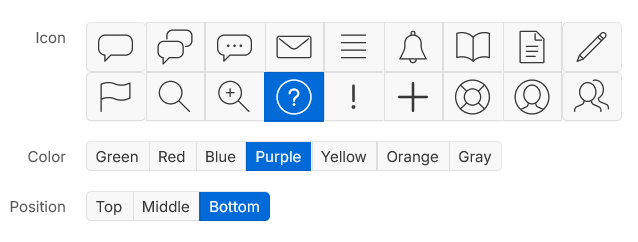
The widget can be tailored to match your brand's look and feel. Adjusting the floating button's style and color allows for a harmonious design that aligns with the overall website aesthetics. It also uses all submission forms, automation settings, and customized preferences from the portal, without creating separate workflows or configurations.
Form Customization
Modify the contact form fields to capture the information you need. Add or remove fields, set mandatory inputs, and tailor the form to specific requirements.
Knowledge Base Management
Organizes articles, FAQs, and troubleshooting guides in a user-friendly manner. No more need to manage the FAQs in a separate content management system.

Help customers reach your team in just a few clicks!