
Support Ticketing System Without Operational Overhead
AI-driven support ticketing system that helps teams organize requests, automate workflows, and resolve issues faster.
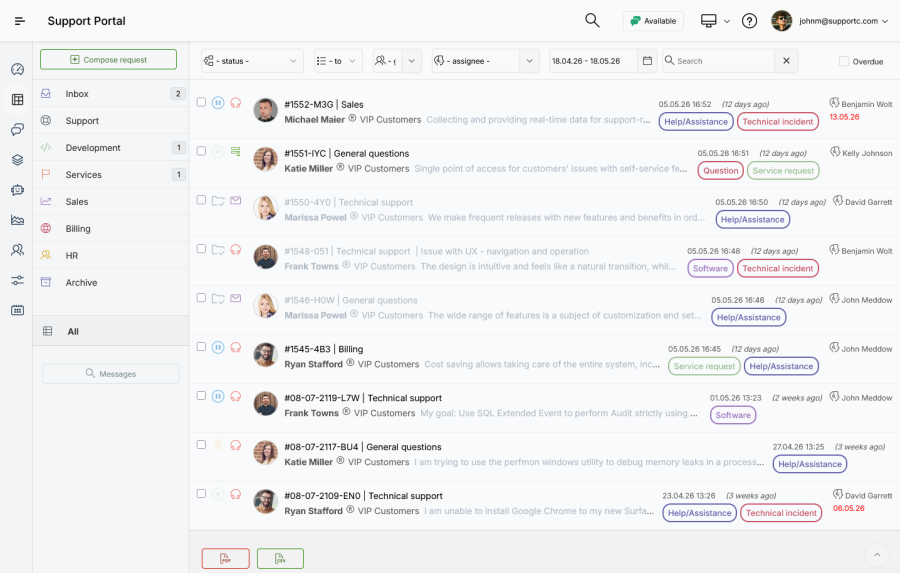
Designed for Collaborative Customer Support
The support ticketing system is designed for teams and companies that are looking to improve how they store, manage, and resolve a growing volume of customer requests and tickets. Support tickets centralize every issue in one place, ensuring that team members can view, prioritize, and resolve them efficiently:
- Each ticket contains all information necessary to understand the problem, track progress, and document the solution path.
- All replies and messages, regardless of the communication channel they originate or the type of user, are securely recorded and flow into the same data repository.
- Agents utilize AI-recommended responses to user queries, helping teams respond more consistently across different communication channels.
The integrated approach reduces response times and provides a continuous and efficient workflow for all relevant users:
Help Desk Agents
Provided with recommended solutions to problems in daily support activities.

Customers
Stay informed with real-time updates in resolving their requests with timely information.
Managers
Assign requests and monitor service performance to track and manage SLAs.
Built-in Action Forms
Support ticketing actions are driven by built-in action forms. There are different action forms, each handling the data required to deliver the relevant responses, as well as other data needed to manage the ticket workflow.
Reply and Resolve
Write the response and select additional actions to successfully resolve a customer request, e.g., add attachments, notifications, and time tracking.
Internal Comments
Collaborate on issues privately without exposing notes to customers. During the comment submission, agents select team members that will be notified by email or desktop notification.
Canned Replies
Quickly choose and add commonly-used text snippets to replies to ensure consistent answers to customers.

Bulk Actions
Apply a single action to a ticket list with a few clicks of the mouse, without updating tickets individually.
Billable Time Tracking
Track the duration of individual help desk actions and how much time is spent on suppport activities for billing and reporting.
Shared Inboxes and Queues
Keep tickets organized by internal help desk structure, service team, or responsibility, and grant access to separate teams.
Classification
Classify tickets with one or more keywords: set up multiple tags for reporting and filtering.

Comprehensive Action Log
Whether an action is performed using the web form or email client software, the log provides historical insight into the submission and resolution process of tickets. This information is used to track and investigate how a source request was initiated and later resolved.
Full Audit Trail
Maintains a complete history of all transactions related to the ticket, including manual and automated actions. Action and system events are displayed in a ticket-relevant chronological record: source request's description, customer and agent replies, comments, attachments, assignments, scheduled actions, and others.
Search Messages
Search the database of ticket replies, comments, and descriptions using a token-based search engine.
Extensive Customization
Set up submission forms and enable customers to add important information about requests, enabling submission via internal portal, public submission form, REST API, and web help widget.
Topics & Forms
The submission forms are organized and customized according to ticket topics. For each topic, a corresponding submission form is created, providing clients a structural data form for description of their requests and issues.
Custom Fields
Add multiple text fields, select list fields, and date-time fields for selected topics. Optionally enable or disable subject and attachments.
Updateable Fields
Enable agents to update information with specific data not visible to customers. Whenever an agent updates any information, the change is added to the Action log.


Agent-as-a-Customer
Agents can manually compose requests, create tickets on behalf of customers, and further manage and track them like any other. This is useful when a customer describes a request over a phone call, as well as when an internal ticket or task needs to be created - Agent-as-a-Customer. Agents utilize the simple compose form with the following data:
- Customer lookup from the database or a new entry
- Assignment and deadline
- Classification with tags
- Billable time spent on the description and composition
- Custom attributes set for the selected topic
- Outgoing notifications.
Customizable as You Grow or Change
Empower your service and support team
By ensuring fast implementation and efficient utilization, you'll improve your company's ability to address issues and requests supporting diverse customers in a centralized help desk platform.