

Each customer support center needs a helpdesk software solution to ensure a good starting position in the customer satisfaction game. One of the most important resources needed to improve customer support and deliver a better customer experience is the online knowledge base.
According to the most widely accepted definitions, a knowledge base is:
- A collection of facts, rules, and procedures organized into schemes,
- The assembly of all other information and knowledge in a specific field of interest.
Information centers maintain a knowledge base that stores possible solutions and comments about previously solved problems. Accordingly, a knowledge base used in a help desk environment for customer support contains information about common problems, incidents, customer requests and their solutions. The knowledge base captures and organizes problem-solving information providing existing knowledge can be applied to new problems. It should be continually updated as support staff contribute their comments, as well as user problems are solved and archived.
The knowledge base also helps to establish your authority as an expert on topics or information related to your products and services. It serves both customers and team members in two similar ways:
- An external knowledge base or an information management system that assists in the acquisition of new customers, or as
- Internal resources available to agents in their issue-resolving process.
Consequently, there are two primary results:
- On the support side, support load is reduced and team efficiency is boosted
- On the customer side, the customer satisfaction grows as agents give accurate suggestions in a short time.
Purpose of the Knowledge Base
There are several goals that each knowledge base software needs to achieve:
- Provide 24×7 assistance to agents and customers and reduce waiting time.
- Ease pressure on support/service team by driving away daily and minor queries to self-service channels.
- Serve as an internal training and solution center for agents.
- Organize all information and knowledge into suitable categories that team members and customers need in one console.
Building a Structure
A knowledge base is usually broken down into categories and components. These components include the case base, the vocabulary used to describe the cases, and the similarity measures used to compare cases. It also incorporates articles, hardware and software manuals, and frequently asked questions.
Until recently, building a knowledge base was a challenging and a time-consuming experience. It required expert developers who were well trained in the programming languages, writing scripts, and case-based reasoning theory. The process required specialized training and a serious commitment of resources that did not always pay off.
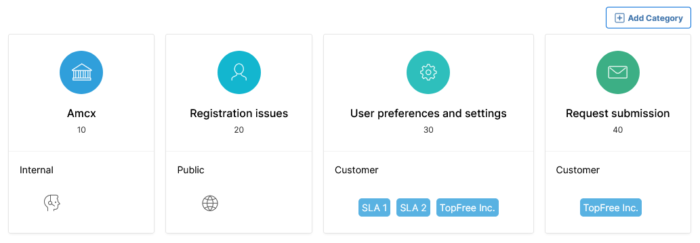
With SympoQ, you can add different categories that help you organize all articles into a repository containing different groups of information. For each category, you can set the access permissions and provide or deny access to the category and all articles within it. After categories are defined, you can edit and add articles, or save them as drafts.
Top Features
SympoQ’s knowledge base eliminates information searching for agents and serves as the authorized source of information. Your SympoQ support account comes with a pre-configured knowledge base. You can add and modify its contents and arrange them dynamically. It’s the perfect tool to empower your customers with a robust self-service system and answers to common frequently asked questions:
- Different content available for helpdesk agents, and customers, regardless of whether they are registered or anonymous
- Create and edit categories to group relevant information
- Provide different levels of access permissions to each category
- Add category list order, an icon that appears along with the name, and select access permissions: internal, customers’ or public
- Create and edit articles using a rich HTML editor
- Select article visibility and the publish date.
The settings area allows help desk administrators to view, modify and add categories and articles. They can search, add, edit, download, and filter information.
Implementation and Content Writing
There is no exact rule as to how you should implement the knowledge base. When you are implementing it for the first time, you may find yourself in a dilemma about where to start from, or which topics are the most relevant to customers and agents. It’s good to have a strategy on how to create, write, and update your knowledge articles.
The usual starting practice is by addressing the most asked questions. You can find these information in your ticket list and ticket history.
Another common approach could be giving a feel of your product or service to a new user. You can simply write articles regarding service processes or product information for new users, including step-by-step instructions.
With an easy-to-use knowledge base builder, building the knowledge base requires only expertise in the content. In fact, the best knowledge bases are built by content experts – people who have knowledge and experience in the subject matter. In a help desk environment, it is usually the help desk technician or support representatives. With the intuitive development interface, there is no need for programmers, experts, or even webmasters.
Customers usually access a knowledge base when they want to troubleshoot an issue. Using a friendly tone in your content can make it interesting. You could also use multimedia content and give a fresh look to your information resources.
Smart Search
Searching for the right information doesn’t need to be a difficult process. You can find answers to common questions and more in the least amount of time.
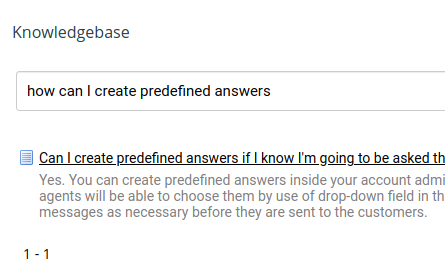
SympoQ’s allows customers to search for published articles and rate them. Using the smart algorithms, the search engine provides a ranked list of the recommended articles based on free text questions.
In addition to products descriptions, prospective customers often look at the knowledge base before the final product purchase. What they read has a huge impact and greatly influences their purchase decisions. That’s why the knowledge base resources should be searchable, readable and comprehensive.
