Managing Service Level Agreements becomes more complex when a help desk supports multiple customers. Different customers may have different response and resolution targets, while services such as Support, Maintenance, Development, and Billing may require separate SLA rules.
Sympoq’s automation rules provide building blocks for translating these requirements into ticket-handling workflows. These requirements can be implemented through automation rules that classify incoming tickets, set deadlines, route requests, assign agents, send notifications, and trigger time-based escalation actions. The result is a flexible approach to SLA management in which different customers and different services can follow different operational paths.
This guide explains how to build a flexible help desk SLA management process with Sympoq.
From SLA Documents to Repeatable Help Desk Processes
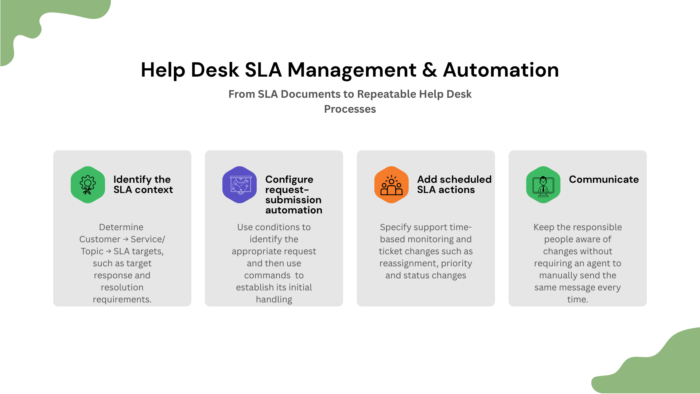
A help desk SLA should be more than a document describing target response and resolution times. It becomes useful when its obligations consistently influence what actually happens to tickets. They should influence how tickets are classified, routed, monitored, escalated, and communicated. With Sympoq, that can be approached as a combination of service classification and automation.
A common mistake is to start by asking: “What automation rules should we create?”
Instead, start with: “What exactly have we promised this customer for this service?”
Then map each obligation to an operational rule. For every customer × service/topic combination, document:
- Target response requirement.
- Target resolution requirement.
- Initial queue.
- Responsible agent or team.
- Resolution deadline.
- What should happen as the limit approaches.
- What should happen when the target is exceeded.
- Who needs to be notified.
- What happens when progress is blocked by a missing customer response.
- How the ticket should ultimately be closed.
Please not not every SLA will require all ten elements. The point is to make the contractual requirement explicit before translating it into automation. For example, a small support team might have to fulfill only the resolution deadline and who needs to be notified.
Start with Your Services and SLA Targets
Before configuring automation, the first step is to define the services your help desk provides. Depending on your core business, a service catalog can include services such as:
- Technical Support
- Maintenance
- Development
- Billing
- Infrastructure Support
- Account Administration.
Sympoq’s SLA guidance recommends identifying meaningful ticket categories and reviewing actual service performance before establishing service levels. Categories with significant or meaningful case volumes can become candidates for individually defined service agreements.
From there, define the SLA for each customer and service combination by using the ticket “Topic” as the category. For example:
| Customer | Topic | Resolution target |
| Customer-A | Support | 24 hours |
| Billing | 48 hours | |
| Customer-B | Support | 8 hours |
| Maintenance | 24 hours | |
| Customer-C | Development | 72 hours |
Please, note these resolution targets are illustrative examples. Your actual values should reflect the SLA agreed with each customer.
How SLA Management Works in Sympoq
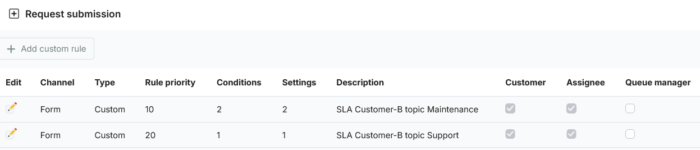
Sympoq automation rules can monitor incoming requests and perform predefined commands when specified conditions are met. There are three relevant groups of automation:
- Request submission rules, and
- Scheduled actions.
Along with these automations, you can also send automated notifications to customers, assigned agents or managers using predefined email templates. For an SLA escalation, this provides a useful way to keep the responsible people aware of changes without requiring an agent to manually send the same message every time.
Request submission rules and scheduled actions can use values of ticket attributes and data for conditions, including:
- Customer
- Customer group
- Topic
- Inbound email
- Subject content
- Message content
- Customer name or email
When the conditions match, Sympoq can automatically set the ticket’s Queue, Assignee, Deadline, and Tags. Multiple custom rules can be created for different scenarios. For example:
IF “Customer = Customer-A” AND “Topic = Support”, THEN
> Assign the ticket to the Support queue and set a 24-hour deadline.
A different rule could apply to the same customer’s Billing requests:
IF “Customer = Customer-A” AND “Topic = Billing”, THEN
> Assign it to the Billing queue and set a 48-hour deadline.
This enables SLA handling to differ both between customers and between services provided to the same customer.
Automating SLA Escalations
An SLA needs more than an initial deadline. You also need to decide what should happen when a ticket approaches or exceeds its service target. Sympoq Scheduled actions provide time-based automation for scenarios including:
- Reassignment
- Additional categorization
- Priority escalation
- Status changes
Scheduled rules can check whether a ticket has not been responded to by an agent or customer, or has not been closed, within a specified time relative to creation, deadline, or an agent response.
This means that an SLA may be implemented using multiple complementary automation rules, rather than one large rule. Here are four practical examples.
Use Case 1: Escalate Customer-A Support Tickets After 24 Hours
Suppose Customer-A has a 24-hour resolution target for Support requests. If the ticket remains unresolved, it needs to be escalated to Level 2 Support:
- Rule A1 – Route the incoming ticket: Create a Request submission rule:
- Conditions:
- Customer: Customer A
- Topic: Support
- Command (set values):
- Queue: Support
- Assignee: Level 1 agent
- Deadline: 24 hours
- Tags: customer-a-sla
- Conditions:
- Rule A2 – Escalate unresolved tickets: Create a Scheduled action for tickets that meet the SLA’s time-based escalation condition.
- Conditions:
- Customer: Customer A – same as for the Rule A1
- Topic: Support – same as for the Rule A1
- Ticket is not: Closed
- For: 1 hour
- Event type: Before deadline
- Command (set values):
- Assignee: “Agent-2” (choose named agent)
- Priority: High (optional)
- Conditions:
Use Case 2: Different SLAs for Customer B Support and Maintenance
A single customer may have different targets for different services. Suppose Customer-B has these targets:
- Support: 8-hour resolution target
- Maintenance: 24-hour resolution target
These example targets would require separate classifications.
- Rule B1 – Create first request submission rule:
- Conditions:
- Customer: Customer-B
- Topic: Support
- Command (set values):
- Queue: Priority Support
- Deadline: 8 hours
- Tags: customer-b-sla
- Conditions:
- Rule B2 – Create second request submission rule
- Conditions:
- Customer: Customer-B
- Topic: Maintenance
- Command (set values):
- Queue: Priority Support
- Deadline: 24 hours
- Tags: customer-b-sla
- Conditions:
With these two rules, the distinction also makes operational sense. Customer-B is still a single customer, but “Support” and “Maintenance” represent different services and therefore not have identical resolution targets.
Best Practices for SLA Management
When configuring SLA automation, keep in mind the following best practices:
- Define SLAs per customer and service – Avoid assuming every request from the same customer needs the same target. This is your primary guidelines when settings automations with Sympoq.
- Use focused automation rules – Separate automation by ticket routing, deadlines, escalation, and inactivity management when appropriate.
- Use clear rule descriptions – A descriptive naming convention makes customer-specific rules easier to maintain.