Help Desk Roles and Responsibilities
User management provides the creation and management of user accounts across your help desk. It uses role-based access following standard help desk roles and their responsibilities. Having the common service and support process, the roles are very similar in different companies and organizations. For example, roles in IT and HR departments are usually the same, although the types of requests could be different.
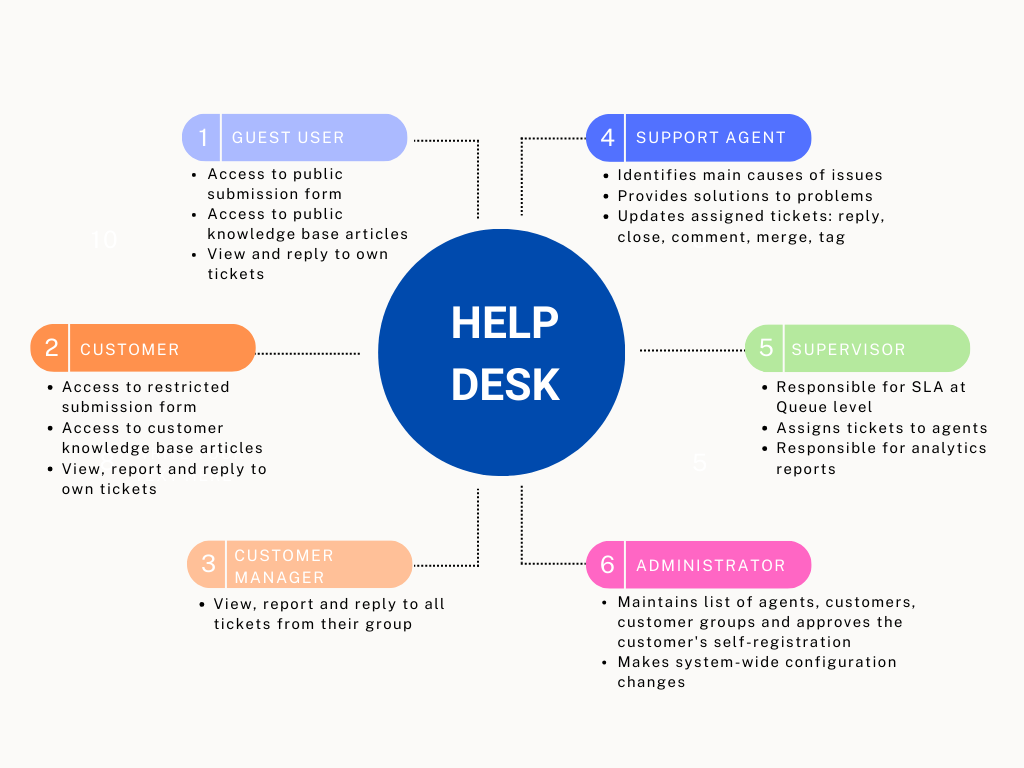
Before starting with the adoption of the user management, there are several prerequisites that need to be considered.
One of the prerequisites is to first determine the people on the support side who will directly participate in the process, and then to assign tasks to them. When competent people are selected and trained, the preconditions for an effective help desk will be created. Otherwise, if these conditions are not met, the likelihood that the adoption will not be successful increases.
When setting up a technical support in your company, it is essential to fully understand your requirements and the entire process. This applies to all companies where interaction with customers is intensive and crucial for the quality of service: IT support team, HR department, service department, etc.
Identification and Selection of Help Desk Staff
The first issue that needs to be considered is to identify and select persons in your organization who will serve the help desk and act as a primary contact with customers. They can resolve many typical issues requested from customers, even without specific domain knowledge, and they are known as the Level 1 support. There are several attributes that a person needs to have:
- The person needs good interpersonal skills.
- They do not need to be technical, but they need to be well organized.
- They should not be the person working on support, maintenance, or service tasks directly because they will be somebody responsible for resolving issues.
The last attribute is related to the fact that the person who resolves issues should concentrate on their work and not on the details of how to log a support request or a similar daily task. This person or role is commonly known as Level 2 support.
Help Desk Roles
The permissions to perform certain operations are assigned to specific roles. All users who access the application will have one of defined roles. They are primarily used to apply company-wide security policies across the system, e.g., to allocate a specific permissions to agents on support tickets.
There are six different Sympoq roles, which are divided into two groups:
- Support team
- Supervisor
- Support Agent
- Administrator
- Customer
- Guest user
- Customer
- Customer Manager.
Support team roles and responsibilities
Typically, a well-organized service or support organization has a person or team responsible for ticket management and is commonly referred to as a Supervisor. In mid-sized and large companies, there can be several teams that have experience working on different requests and ticket topics. In Sympoq, each team is responsible for all tickets organized and grouped within a ticket Queue, which is further supervised by Queue manager. Other responsibilities of Queue manager include:
- Service Level Management (SLA) at the Queue level
- Assigns to one of the specialized agents based on the type of request, either manually or by specifying workflow rules for automated assignment
- Leads support and service communication with other Queue managers, agents and customers
- Prepares and reviews analytics reports for managers or for customer representatives
- Updates assigned tickets using built-in ticket forms and actions: Assigns tickets, and optionally Deletes a ticket.
They can also perform the other predefined ticket actions, which are listed below.
With the Agent role, a team member can resolve assigned customer issues and requests and communicate directly with customers. Their detailed responsibilities are:
- Identifies the main causes of a problem or request
- Provides information about the progress of the problem to Customer and Queue manager
- Provides solutions to problems
- Uses Knowledge base with known errors to provide diagnostics
- Updates assigned tickets with the following actions: Reply to customers, Close a ticket, Comment, Move tickets between queues, Merge similar tickets, and classify tickets using the Tag action.
They also have access to the Analytics area for the assigned queues and all corresponding tickets.
Along with the ticket permissions, each member of the team can also have the Administrator role, which allows access to the administrator's control panel. This role allows them to make system-wide configuration changes. The administrator also maintains the list of agents, customers, customer groups and approves the customer's self-registration.
Customer roles and responsibilities
The customer roles are related to all users from the customer side: Customer, Customer Manager, and Guest user. For each role, the corresponding permissions and responsibilities are assigned:
-
Customer manager:
- Represents a particular user group, department, or company
- Is aware of all services used by the group or department they represent
- Has an understanding of the application and importance of the services used in their area
- Reviews aggregate reports
- Has an overview and summary information of all tickets that belong to their group
- Updates all group tickets with actions Reply and Close.
-
Customer
- Submits tickets using the ticket submission form
- Updates submitted tickets with actions: Reply and Close
- Has overview of their own tickets.
-
A Guest or anonymous user is a customer who is not registered, but has access to a certain resources:
- Public Request submission form, public Knowledge Base articles, and the Self-registration form, if they are enabled in the Settings section
- Updates their own tickets with Reply and Close actions.
Best Practices
The next phase is to establish a process that ensures proper recording of customer calls and request submissions:
- Agree on how calls and requests should be recorded and decide how much extra work should be involved in recording details of issues, incidents, or requests.
- Decide which role in the organization can accommodate the additional work of maintaining the request or log.
- Make sure that customers know how to submit their requests.
The role of a single point of contact could be an additional function for one of the staff within an organization, such as administration staff or another nominated person.